
Now that your customers can join a waiting list, you will probably want to automate the processing of these lists.
Many actions can make an event available again, for example, a customer cancelling or rescheduling a booking, or an administrator modifying a booking or event.
All these actions have been listed and can be enabled or disabled as needed:
- Go to Booking Activities > Settings > General tab > Process waiting lists when
- Click the “+” icon next to the field to select multiple values.
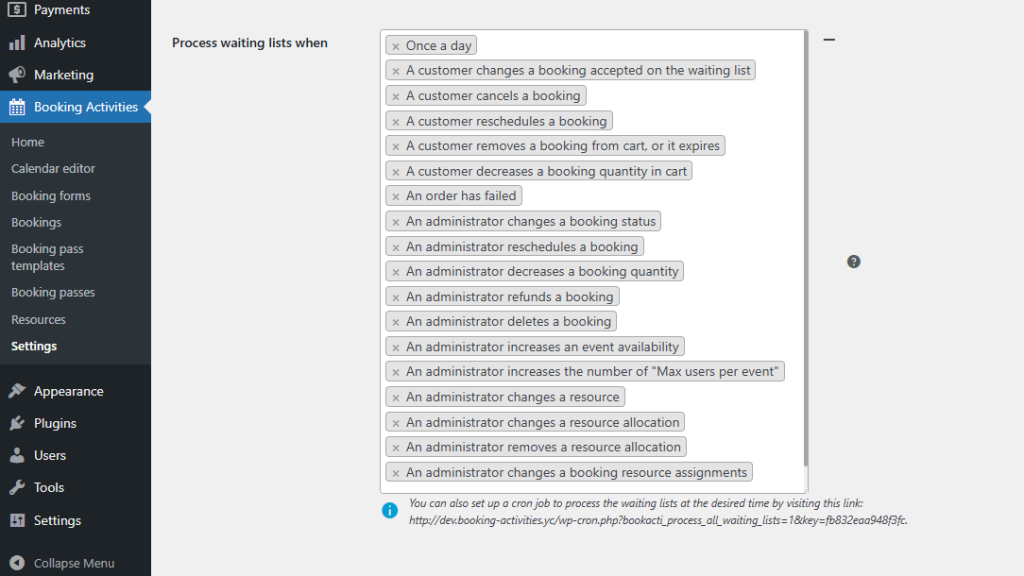
By default, all triggers are active so that the system works out of the box. However, it is sometimes preferable to disable some of them, especially those related to administrative tasks, to avoid being caught off guard during an operation that unexpectedly activates a trigger.
Therefore, you can instead manually trigger the waiting list processing from the back office after you have safely made your changes.